

Payout Lifecycle
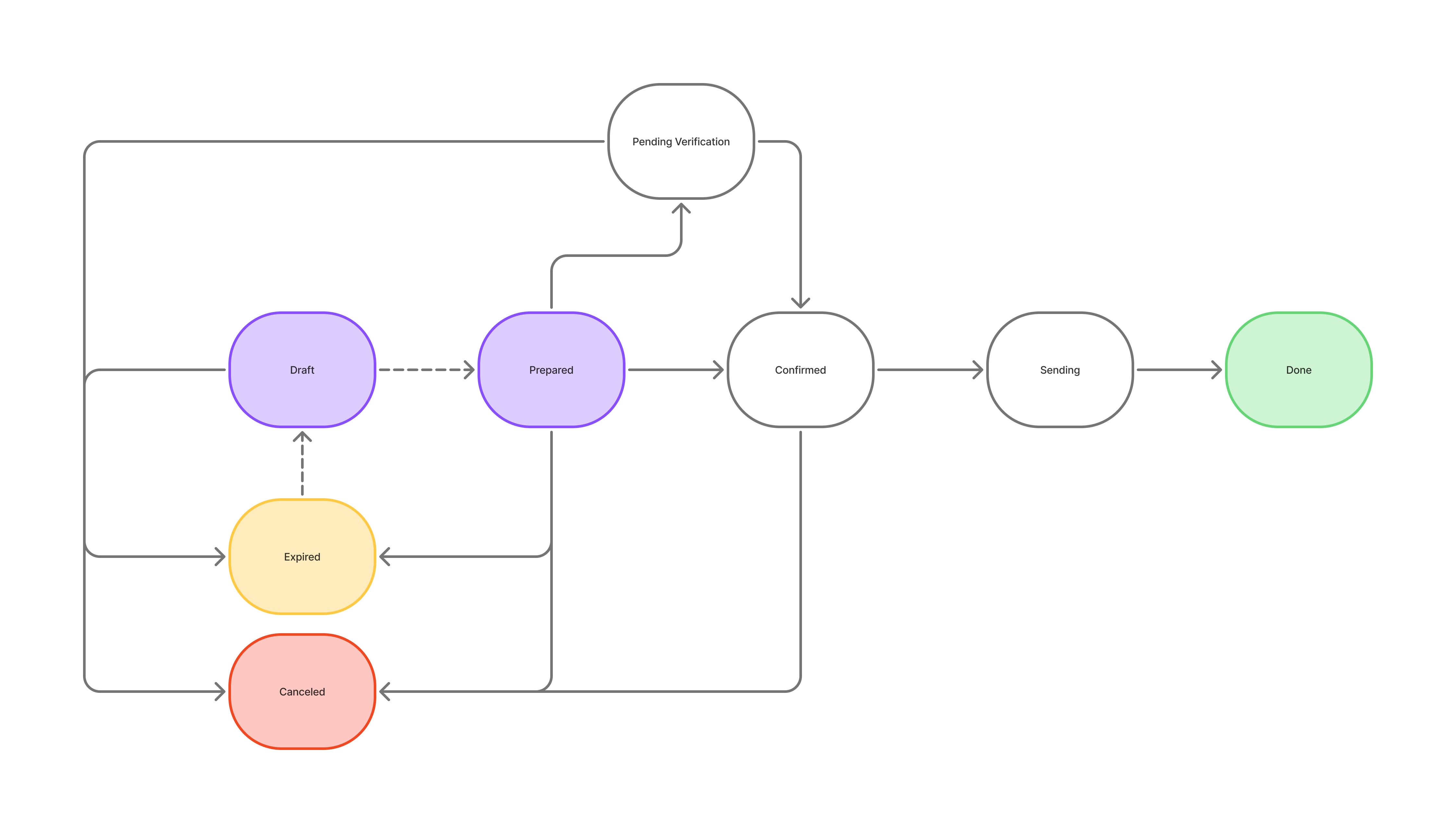
✅ The key rule: treat a payout as paid only when it reaches done. Earlier statuses are not final. If a payout ends in canceled or expired, the reserved amount is released back to your balance.
Payout Statuses
draft
draftA payout without a fixed exchange rate or fees — amounts shown are estimates until the payout is prepared. Drafts have no exchange-rate timeout and are useful for preparing payouts ahead of time or in bulk. When you prepare a draft, the rate and fees are fixed and it moves to prepared. A draft that isn't prepared within 48 hours moves to expired (from where it can be redrafted), and you can cancel it at any point.
prepared
preparedThe exchange rate and fees are now fixed, and the payout is waiting for your confirmation. Confirming it — with two-factor authentication when done in the dashboard — moves it to confirmed, or first to pending_verification when Travel Rule regulations require identifying information from the recipient. If it isn't confirmed before the rate offer expires, it moves to expired. You can also cancel it at this point.
pending_verification
pending_verificationYour recipient must act. The payout is on hold because Travel Rule regulations require identifying information from the recipient. The information can either be submitted by you via API when creating the payout request or, if not submitted or incomplete, Confirmo will email a verification form to the end-customer.
If Confirmo emails the form to the end-customer the recipient has 24 hours to complete the form. If they do, the payout moves to confirmed and continues automatically. If they don't, the payout moves to expired. If their verification is refused, the payout is canceled. You can also cancel the payout yourself while it waits here.
confirmed
confirmedYou have accepted the exchange rate and the payout is queued for processing. As soon as the transaction is submitted to the blockchain network, the payout moves to sending.
If a payout stays in
confirmedfor a prolonged period, query it again via the API or check it in the dashboard. A payout held for an extended compliance review carries the substatuscompliance_holdwhile it remains inconfirmed. Substatus changes never fire webhooks — the hold is only visible when you re-read the payout.
sending
sendingThe transaction has been submitted to the blockchain network. This status is reserved for genuinely submitted transactions — a payout that is still being processed internally remains in confirmed. Once the transaction completes and the txid is assigned, the payout moves to done.
done
doneThe payout has been successfully processed and a transaction ID (txid) is assigned. This is the terminal success state.
expired
expiredThe payout was not acted on within the required timeframe. The reserved amount is released. An expired payout can be recovered back to draft (redrafted) and sent later.
canceled
canceledThe payout will not be processed and the reserved amount has been released back to your balance. This is a terminal state. A payout can end up here for several reasons — deliberate cancellation by you, a compliance refusal, or a failed recipient verification. Check the substatus field to see why — see the catalog below.
Lightning payouts start in a
waitingstatus instead ofpreparedwhile the Lightning invoice is awaited. All other statuses behave the same.
When a Payout Doesn't Complete — substatus
substatusThe primary status always tells you where the payout is and whether your funds are reserved. The substatus field adds the reason — it is a purely descriptive field returned in the payout object (API responses and webhook payloads) and shown in the dashboard.
Substatus changes never trigger webhooks. A webhook fires when the primary status changes, and the payload includes whatever substatus applies at that moment. To see a substatus change that doesn’t come with a status change (such as compliance_hold), re-query the payout.
Substatus values
| Substatus | Appears on | What it means for you |
|---|---|---|
compliance_hold | confirmed | The payout is under an extended review; funds remain reserved. It resolves either by release (processing continues normally) or by rejection (canceled with screening_rejected). This is the only non-terminal substatus — and it is pull-only: no webhook fires, so re-query a payout that stays in confirmed unusually long. |
screening_rejected | canceled | Compliance refused the transaction. The reserved amount has been released. |
verification_rejected | canceled | The recipient’s counterparty verification was refused. |
manually_canceled | canceled | The payout was deliberately canceled by a person — a user on your account or a Confirmo administrator. |
| (null) | any | No specific reason is available. |
A canceled payout is never retried by Confirmo. To send the funds again, create a new payout.
Data Purging
Payouts that transition directly from prepared to expired are subject to data purging after a retention period, similar to invoices.
Updated about 2 months ago