

Bulk Payouts
To save draft payouts and enable bulk actions, you might have to enable Extended payout options in Settings > General. Consult with your technical team, as this changes the behavior of some payout API endpoints and might break your integration. Once enabled, this cannot be undone.
Batch actions
Batch actions allow you to process multiple payouts at once. All batch actions, that are available, are following:
Prepare - Transform payout draft to prepared for amounts and fees confirmations.
Confirm - Confirm amounts and fees of prepared payout and initiate send to destination addresses.
Redraft - Restore expired payouts back, so they are drafts again.
Bulk process
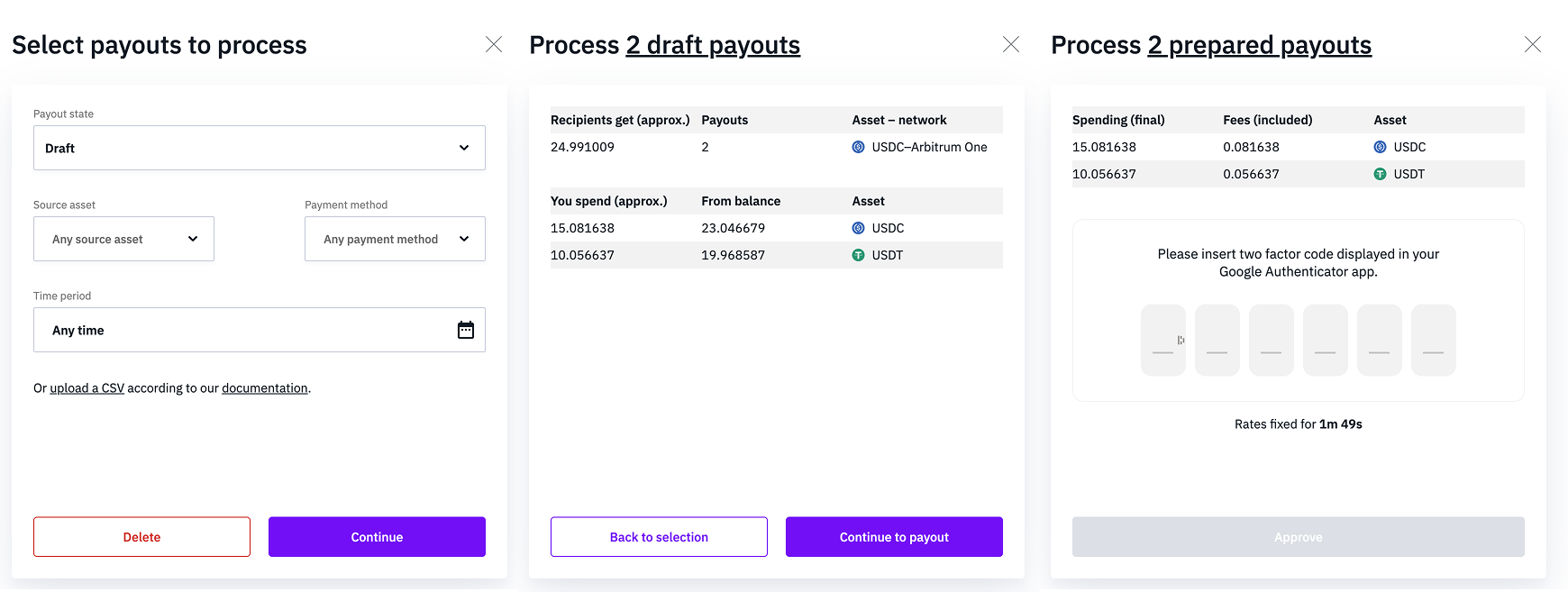
Draft, Prepared and Expired payouts can be processed in bulk. After clicking ‘Bulk process’, first select which type you want to process, then continue to the available actions.
For Draft payouts, you will see a summary and will be able to move them all to the Prepared state and approve them all at once. Expired payouts can be turned into Drafts.
Failure
There are two types of failures that might happen for batch actions.
First type is that the action fails because of an error caused by a payout state, merchant balance, and so on. In that case, failure for one payout means failure for all the payouts. Therefore original state is kept for all the payouts in batch, and for your balance.
Other type is that the action fails when the transaction has already been requested. For example, it might've been waiting for verification from our side or it might've been waiting to be confirmed on blockchain. When it fails, only the one payout that fails is affected. Other payouts might still succeed.
CSV upload
Multiple Draft payouts can be created by uploading them as a CSV file. Refer to this example file and make sure to read the Guide tab for descriptions of each column. You can duplicate the example and populate it with your payouts, or download the CSV template.
Updated 6 months ago