

Deposit Lifecycle
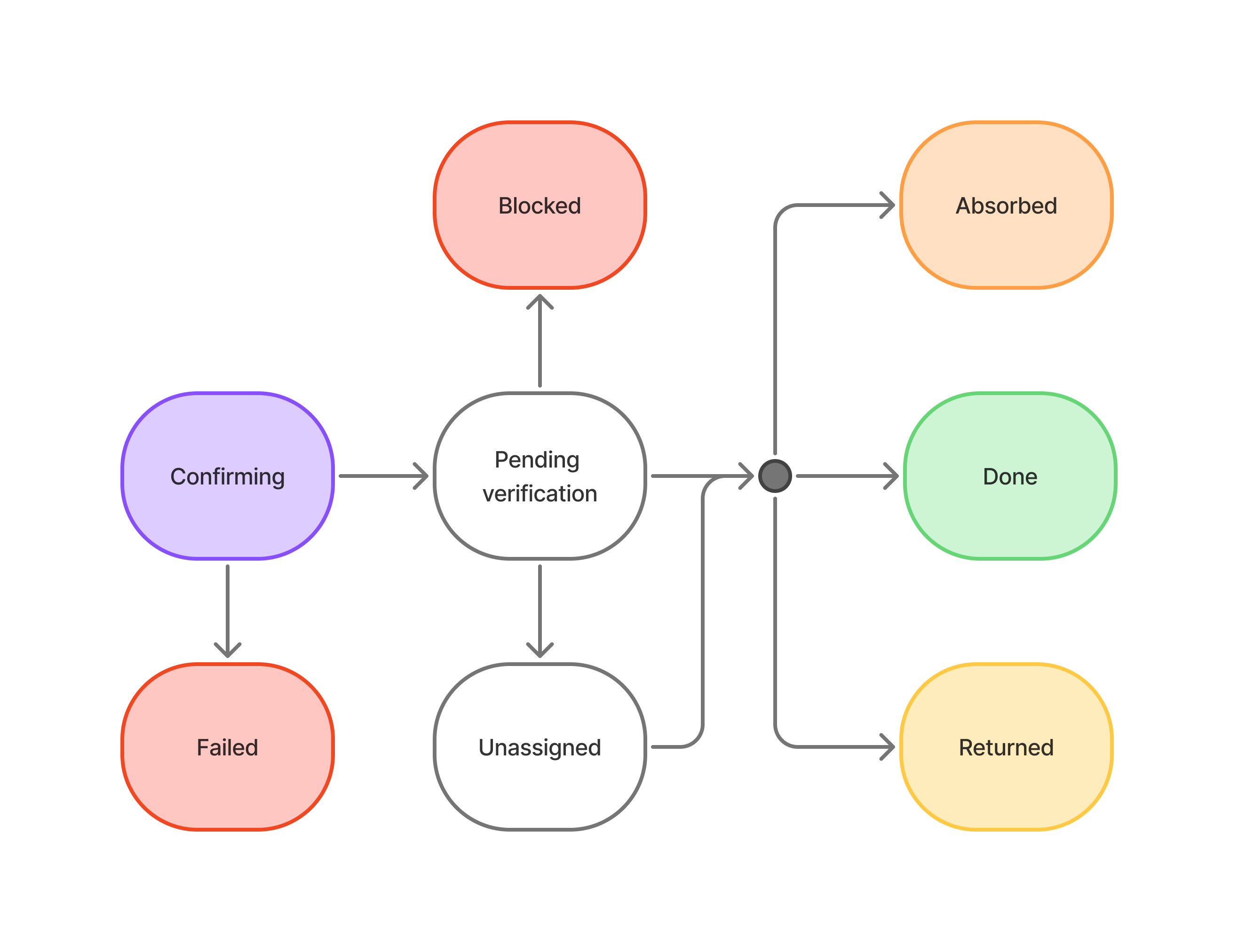
Every incoming deposit moves through a series of statuses. You receive a webhook at each transition if a notifyUrl is configured on the account.
The key rule: only credit your customer when a deposit reaches
DONE. Earlier statuses are not final.
Deposit Statuses
CONFIRMING
CONFIRMINGConfirmo has detected the transaction on-chain. The deposit is waiting for the required number of block confirmations. Confirmation time varies by network.
PENDING_VERIFICATION
PENDING_VERIFICATIONThe transaction has reached the required number of confirmations and Confirmo is running its internal compliance checks. In most cases this is automatic and resolves on its own with no action required.
DONE
DONEThe deposit is fully confirmed, all checks have passed, and your Confirmo balance has been credited. This is the point at which you should credit the funds to your customer. Terminal state.
UNASSIGNED
UNASSIGNEDThe deposit could not be credited to your balance — for example because the deposit address was set to inactive. Contact Confirmo support if you receive funds in this state unexpectedly.
RETURNED
RETURNEDFunds have been sent back to the originating wallet. This can occur when Confirmo cannot process the transaction, or following a failed compliance check. When a deposit is returned, the webhook includes the refund transaction hash so you can reconcile the on-chain return. Terminal state.
ABSORBED
ABSORBEDThe funds remained in an unresolved state for an extended period, as specified by the Confirmo Terms and Conditions, and have been claimed by Confirmo. Terminal state.
BLOCKED
BLOCKEDThe funds have been frozen for compliance reasons and the deposit address has been suspended. Do not send any more funds to this address. Terminal state.
FAILED
FAILEDThe payment failed on the blockchain and Confirmo never received the funds. Terminal state.
Account-Level Blocking
Separately from an individual deposit being BLOCKED, Confirmo's compliance team can block an entire deposit (funding) account. When that happens:
- The account's
statuschanges toBLOCKED. No further deposits are accepted or processed on any of its addresses. - You receive an account-level webhook notifying you that the account has been blocked - see Deposit Webhooks → Account events. If you have not specified a
notifyurlyou will receive an email notification instead to your Confirmo registration email. - A blocked account is admin-only — you cannot un-block it yourself. Contact Confirmo if you believe an account was blocked in error.
Updated 6 days ago