

Crypto Address Book
Register the wallets and exchange accounts you use to fund and withdraw from your Confirmo balance.
The Crypto Address Book is the list of your own crypto accounts that Confirmo has verified. You register each wallet or exchange account once. After that, Confirmo uses the entry for two things:
- Crypto top-ups: an entry tells Confirmo that crypto arriving from this account is your own money, so it can be credited to your balance.
- Crypto withdrawals: you can only withdraw to an account that is in your address book.
Only for your own accounts. The address book covers first-party transfers, meaning money moving between you and Confirmo. You don't need it to pay third parties (Payouts) or to receive funds from your customers (Deposits).
Key concepts
Hosting type: who holds the account
hostingType | Use it for | What identifies the entry |
|---|---|---|
SELF_HOSTED | A wallet whose keys you control, such as a hardware wallet, a multisig or an MPC wallet | The wallet address |
VASP | An account at an exchange or another custodian (a Virtual Asset Service Provider) | The exchange and your username there (vasp.identifier + vasp.accountUsername) |
Designations: what the account is used for
Each entry has one or both of these designations:
| Designation | Meaning |
|---|---|
TOP_UP | You send crypto from this account to fund your Confirmo balance. |
WITHDRAWAL | You withdraw crypto from Confirmo to this account. |
Rules:
designationsis required and can't be empty.- Bitcoin and Litecoin entries can only be
WITHDRAWAL. Top-ups aren't supported on UTXO networks. - A
VASPentry withWITHDRAWALneeds a staticaddress. This is the withdrawal address you have whitelisted inside the exchange. ATOP_UP-onlyVASPentry doesn't need an address, because exchange deposit addresses change.
One entry per network
Each entry belongs to a single blockchain network (networkId, for example ETHEREUM-BLOCKCHAIN-MAINNET). To use the same wallet on Ethereum and on Polygon, register it twice, once per network. You can register as many wallets as you like on each network.
Registering an entry
Send a POST to /v3/address-book/crypto. Every new entry starts in PENDING. The response includes a verificationUrl, which the account holder opens to prove the account is theirs.
Self-hosted wallet, used for both top-ups and withdrawals
curl -X POST https://confirmo.net/api/v3/address-book/crypto \
  -H "Authorization: Bearer YOUR_API_KEY" \
  -H "Content-Type: application/json" \
  -d '{
    "hostingType": "SELF_HOSTED",
    "networkId": "ETHEREUM-BLOCKCHAIN-MAINNET",
    "address": "0x1111111111111111111111111111111111111111",
    "designations": ["TOP_UP", "WITHDRAWAL"],
    "label": "Treasury wallet",
    "notifyOptions": {
      "url": "https://merchant.example/hooks/address-book",
      "email": "[email protected]"
    }
  }'
Exchange account, used only to top up
{
  "hostingType": "VASP",
  "networkId": "TRON-BLOCKCHAIN-MAINNET",
  "designations": ["TOP_UP"],
  "vasp": {
    "identifier": "https://www.binance.com",
    "accountUsername": "merchant-treasury"
  },
  "label": "Binance corporate account"
}
Response 201 Created
{
  "entry": {
    "id": "cab7Ym1kPq3",
    "hostingType": "SELF_HOSTED",
    "networkId": "ETHEREUM-BLOCKCHAIN-MAINNET",
    "address": "0x1111111111111111111111111111111111111111",
    "designations": ["TOP_UP", "WITHDRAWAL"],
    "label": "Treasury wallet",
    "status": "PENDING",
    "notifyOptions": {
      "url": "https://merchant.example/hooks/address-book",
      "email": "[email protected]"
    },
    "createdAt": 1772539200,
    "updatedAt": 1772539200
  },
  "verificationUrl": "https://verify.example/crypto-address-book/cab7Ym1kPq3"
}| Field | Required | Notes |
|---|---|---|
hostingType | Yes | SELF_HOSTED or VASP |
networkId | Yes | The network the account is on. See GET /v3/crypto-payment-methods for the networks available to you. |
designations | Yes | TOP_UP, WITHDRAWAL or both |
address | Self-hosted: yes. VASP: only with WITHDRAWAL | Must be valid for the network. EVM addresses are checksum-validated. |
vasp.identifier | VASP only | The exchange, as a URL or a name |
vasp.accountUsername | VASP only | Your account ID, username or email at the exchange |
label | No | Your own name for the entry, up to 255 characters |
notifyOptions.url | No | Webhook URL for this entry's status changes |
notifyOptions.email | No | Email address for the same notifications |
Verifying an entry
An entry stays PENDING until it passes an ownership check. The account holder completes this at the verificationUrl:
| Hosting type | What you're asked to do |
|---|---|
SELF_HOSTED | Wallet ownership verification. Prove you control the wallet, either by signing a message with it or by sending a small test transaction. Confirmo never asks for your private keys or seed phrase. |
VASP | Account verification. Upload two documents: (1) a screenshot of the exchange account and (2) a declaration signed by a director. See the requirements below. |
Account verification documents (VASP entries)
1. Screenshot of your exchange account
- Capture the full browser window, unedited, with the URL bar visible. PNG, JPEG or PDF.
- Take it no more than 30 days before you submit it.
- It must show:
- the account holder name, matching your company's legal name exactly (personal accounts of directors or owners aren't accepted)
- the exchange
- the account ID or email
- a date
- the exchange's "verified" (KYC) badge, if it has one
- For
WITHDRAWALentries only: also show the withdrawal address you registered, as it appears in the exchange's own withdrawal-address (whitelist) screen.
2. Signed declaration
A declaration that the account is registered to your company and used only by it. It must be signed by a director or an authorised signatory recorded in your company verification (KYB), with a qualified electronic signature or as a signed scan.
When every check has passed, the entry becomes ACTIVE and you get a notification.
Entry lifecycle
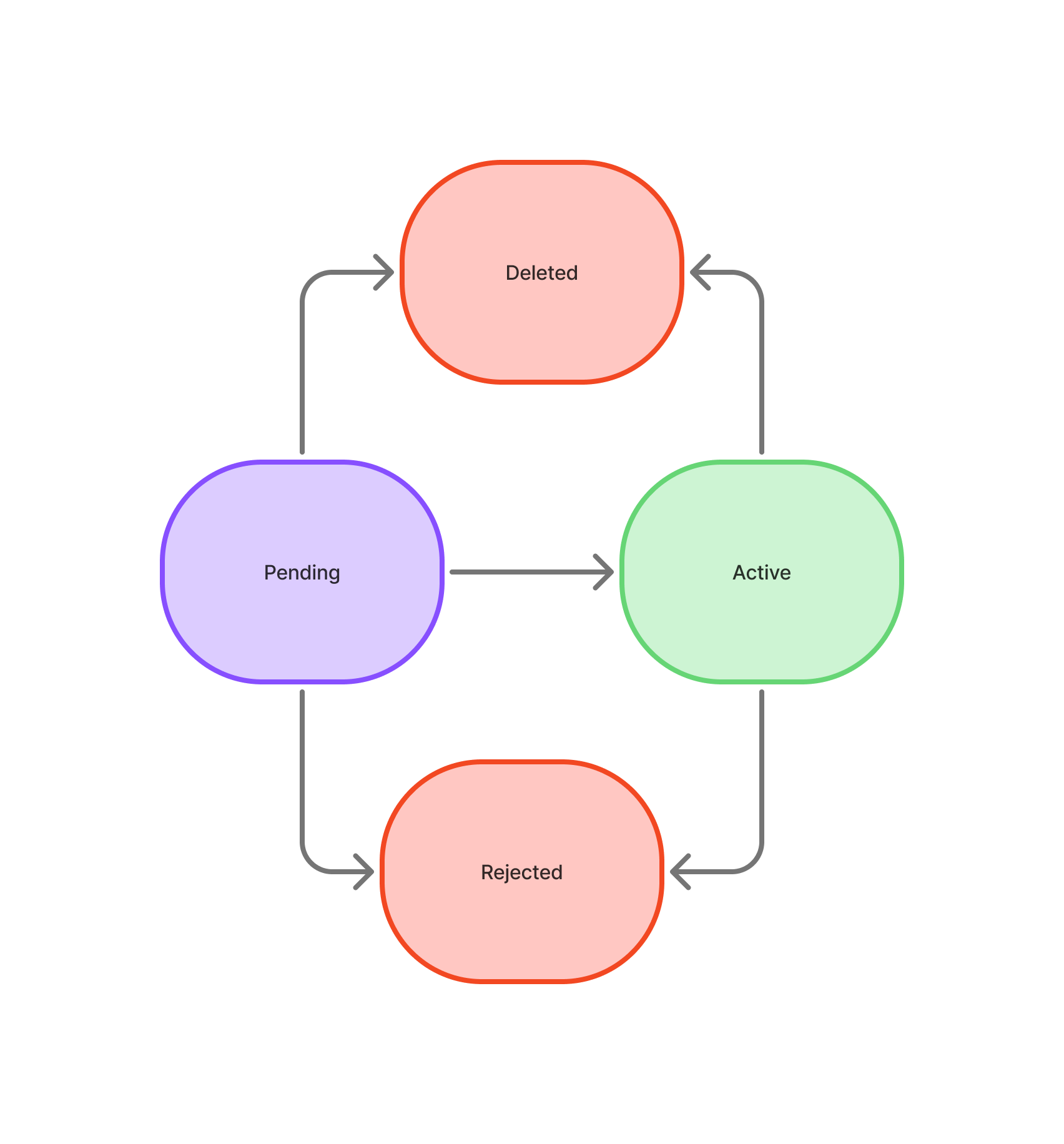
| Status | Meaning | Usable? |
|---|---|---|
PENDING | Registered and waiting for its checks to finish. | No |
ACTIVE | Verified. It can be used for each of its designations. | Yes |
REJECTED | The account didn't pass verification, or was rejected after a later review. This is final for the entry. | No |
DELETED | You removed the entry. It is kept for your records, and GET /v3/address-book/crypto/{id} still returns it. | No |
Only ACTIVE entries can be used. An ACTIVE entry can still be moved to REJECTED later. If that happens, you're notified and the entry can't be used for any further top-ups or withdrawals.
Notifications
If you set notifyOptions, Confirmo tells you every time an entry changes status:
- Webhook (
url): an HTTPPOSTwith the current entry object. It is signed with your callback password like all other v3 webhooks. Failed deliveries are retried with exponential backoff. - Email (
email): the same information (status, address, network, entry ID and time) in readable form.
As with every webhook, re-read the entry (GET /v3/address-book/crypto/{id}) before acting on it.
Managing entries
| Action | Request |
|---|---|
| List entries | GET /v3/address-book/crypto (deleted entries are left out) |
| Get one entry | GET /v3/address-book/crypto/{id} |
| Update an entry | PATCH /v3/address-book/crypto/{id} |
| Delete an entry | DELETE /v3/address-book/crypto/{id} |
What you can change
PATCH can change only the attributes that no check depends on. Leave a field out to keep it as it is; send null to clear it.
| Field | Notes |
|---|---|
label | null clears it. |
notifyOptions | url and email can be changed separately. null clears both. |
designations | Replaces the whole set and can't be empty. You can remove WITHDRAWAL at any time, and the change takes effect immediately. Adding TOP_UP on Bitcoin or Litecoin, or adding WITHDRAWAL to a VASP entry, isn't allowed. |
curl -X PATCH https://confirmo.net/api/v3/address-book/crypto/cab7Ym1kPq3 \
  -H "Authorization: Bearer YOUR_API_KEY" \
  -H "Content-Type: application/json" \
  -d '{ "designations": ["TOP_UP"], "label": "Treasury – top-ups only" }'
What you can't change: the network, address, hosting type and exchange account. These are what was verified. To change any of them, register a new entry and delete the old one.
Entries that are REJECTED or DELETED can't be updated or deleted.
Updated about 10 hours ago